
A garment exporter in Tiruppur was running 4 crore in monthly export orders. Their order processing team was spending 3 hours every morning manually copying data from buyer emails into their ERP. Same task. Every morning. For years.
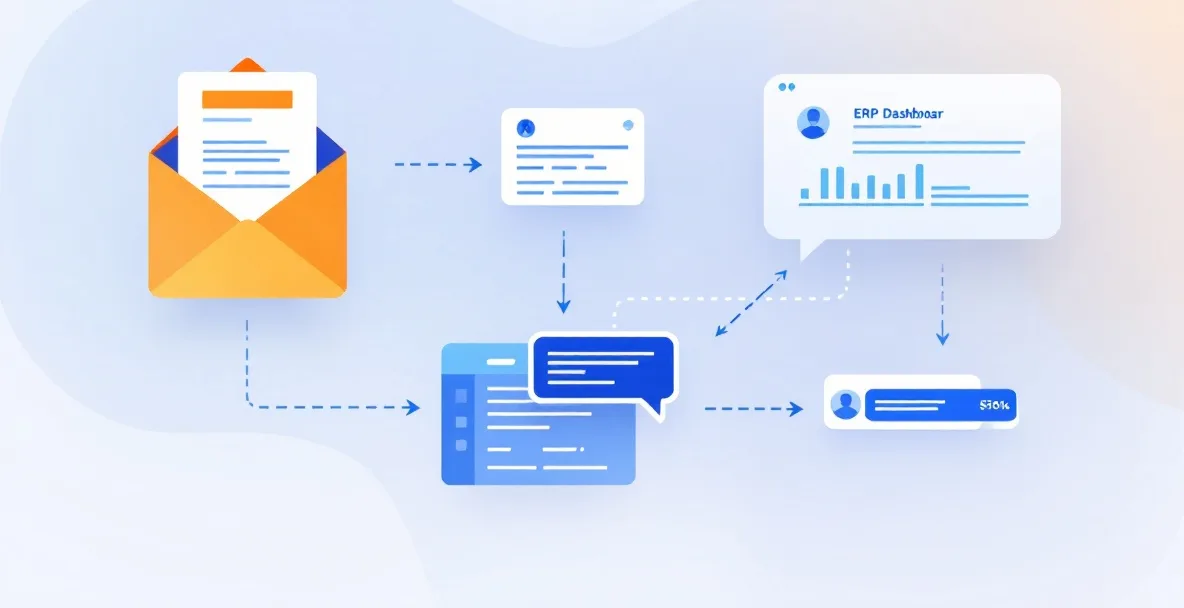
That's exactly the problem an AI agent workflow solves. An AI agent reads the email, pulls the order details, checks the ERP for open capacity, flags any discrepancies, and posts a summary to the production WhatsApp group. The team gets to work. Nobody copies anything.
That's the bottom line: an AI agent workflow is a sequence of automated steps where an AI system makes decisions and takes actions across your tools, without a human in the loop for each step. Not a chatbot. Not a simple macro. A system that works like a smart employee handling one specific job, end to end.
If you're evaluating whether this is real or just more tech hype, read this. We've built these systems for manufacturers, government bodies, and field operations. Here's what actually happens.
What Most People Get Wrong About AI Agents
Everyone's reading about agents. Most companies are doing nothing useful with them.
According to McKinsey's State of AI 2025 report, 62% of organizations are at least experimenting with AI agents. But only 23% are actively scaling an agentic system. And less than 10% have scaled AI agents in any single business function.
Read that again. 62% experimenting. Less than 10% actually running one in production.
The gap isn't the technology. The gap is that companies are demoing agents on clean, sample data and then hitting a wall when they try to run them on real systems. Tally data that's six months behind. PO formats that change with every supplier. Approval chains that exist in WhatsApp and nowhere else.
An AI agent workflow doesn't fix broken processes. It amplifies whatever process you already have. If the process is clear, agents make it faster. If the process is unclear, agents make the mess bigger.
That's the honest version nobody tells you at tech conferences.
How an AI Agent Workflow Actually Works
Think of it in three layers.
Layer 1: The trigger. Something happens. An email arrives. A form is submitted. A sensor crosses a threshold. A time condition fires. This wakes the agent up.
Layer 2: The reasoning. The agent reads the input, checks context from connected systems (your ERP, your CRM, your Google Sheets, your database), and decides what to do. This is where the "AI" part lives. It's not just pattern matching. It handles variation, incomplete data, and conditional logic.
Layer 3: The action. The agent takes one or more steps. Updates a record. Sends a message. Generates a document. Triggers another agent. Escalates to a human if it can't resolve something.
That third layer is what separates an agent from a chatbot. Chatbots talk. Agents do.
A purchase order agent might: receive a PDF from a supplier, extract line items, match them against your open POs in Tally, flag quantity mismatches, auto-approve what's clean, and push exceptions to your accounts manager. No human touches the clean ones. The exceptions get human attention. That's a useful division of labor.
The Real Numbers Behind Agentic AI Adoption
Numbers matter. Here's what the data says.
According to Landbase's 2026 agentic AI report, the global agentic AI market is growing at 43.84% CAGR, from $5.25 billion in 2024 to a projected $199.05 billion by 2034. That's not speculative. That's capital allocation. When this much money moves in one direction, the technology is past the "interesting experiment" stage.
The same report shows companies are reporting average ROI of 171% from agentic deployments. U.S. enterprises specifically are seeing 192%. India will lag by 2 to 3 years on enterprise adoption, but for SMEs starting now, the early-mover advantage is real.
79% of organizations globally have some AI agent adoption. 96% are planning to expand in 2025 and 2026.
But here's the number that matters most for anyone actually building: 40% of agentic AI projects fail due to inadequate infrastructure foundations. Not bad ideas. Not wrong use cases. Bad data, wrong platform choice, no integration layer. The projects that fail aren't failing on the AI. They're failing on the plumbing.
This is why we spend the first two weeks of any agent project just mapping what data exists, where it lives, and how clean it is. The builder who skips this step will waste your money.
The 5-Step Framework for Building an AI Agent Workflow
This is the actual process we use. Not a framework someone wrote in a blog. The one we use when a client calls.
Step 1: Pick one workflow. One.
Not the most impressive one. The most painful one. The task someone on your team is doing manually that takes more than 2 hours a day and produces structured output. Purchase order processing. Dispatch scheduling. Daily production reporting. Quality log compilation.
Pick one. Scope it completely. Map every input, every decision point, every output. Write it down on paper before touching any software.
Step 2: Audit your data quality.
The agent will work with what you give it. If your ERP has 3,000 duplicate vendor entries, your agent will too. Before building anything, check: Is the source data structured or unstructured? How often does it change format? Who owns it? What's the error rate?
If data quality is below 80%, clean it first. This is the boring part. It's also the part that determines whether the project succeeds.
Step 3: Define the boundaries.
What can the agent do on its own? What needs a human? An agent that auto-approves everything will create problems. An agent that escalates everything is useless. Define the confidence threshold and the escalation path.
For most Indian SMEs, a good starting rule is: agent handles anything that matches established patterns with no exceptions, human reviews anything that doesn't. That boundary shifts as the agent proves itself.
Step 4: Build for your existing tools, not new ones.
Your team uses Tally, WhatsApp, Excel, maybe a custom ERP. A good AI agent workflow connects to what's already there. You don't need to replace your accounting software to get automated purchase order processing. You need an agent that reads from and writes to what you already have.
This is where AveoSoft's workflow automation work is different from most vendors. We build integrations into existing systems, not parallel systems you have to maintain separately.
Step 5: Run parallel for 2 weeks before going live.
Run the agent and your manual process at the same time. Compare outputs. Find where the agent gets it wrong and why. Fix the logic before you cut over.
This step takes discipline. Everyone wants to skip it and go live immediately. Don't. Two weeks of parallel running will save you months of firefighting.
What Happens After You Go Live
The first two weeks after go-live, your team will try to break the agent. That's good. Let them. Every exception they find is a rule to add or a boundary to refine.
By week four, the team stops thinking about the agent and starts just using the outputs. That's when you know it's working.
By month three, you'll have clear data on time saved, error rate reduction, and processing volume. That's when the conversation about what to automate next becomes easy.
One thing to watch: agents connected to external APIs (supplier portals, government systems, third-party data sources) need ongoing attention because those systems change. A government portal that changes its login flow will break your agent. Build a monitoring process for this from day one.
If your AI agent workflow is running 24/7 against live production data, maintenance matters. We scope that per engagement based on what's actually running in production, not a flat retainer applied to every project.
Where Indian SMEs Should Start
Not every process needs an agent. Simple, rule-based automation (scheduled reports, data transfer between two systems, form-to-email workflows) doesn't need AI. Use basic automation for those. Save the agent for tasks that involve variable inputs and judgment.
The highest-ROI entry points for Indian manufacturing:
Purchase order processing. Extracting PO data from supplier emails or PDFs and pushing it into your ERP. High volume, structured enough for agents, massive time savings.
Daily production reporting. Pulling data from multiple floor sources, compiling a morning report, and pushing it to management. Frees up 1-2 person-hours per shift.
Dispatch coordination. Matching finished goods to pending orders, generating challans, and notifying the logistics team. Reduces the back-and-forth between godown and accounts.
Vendor follow-up. Automatically chasing suppliers on pending deliveries, logging responses, and escalating aged items. Nobody likes making those calls 15 times a day.
For reference work on how we've built similar systems for field operations and government clients, see our case studies. The RB Digitalization project is a good example of connecting disparate data sources into a usable operations layer.
What It Costs
Automation engagements typically start around ₹2 lakh+, with the final scope shaped by workflow complexity and the number of systems involved. A single purchase order agent connecting email to Tally is a different project than a multi-agent system orchestrating procurement, production, and dispatch.
The honest number to calculate first isn't the build cost. It's what the current manual process costs you. Three people doing 2 hours of data entry daily is roughly 6 person-days per week. At even ₹20,000 per month per person, that's ₹60,000 a month going to a task that an agent can handle. The build cost pays itself in months, not years.
Frequently Asked Questions
What is an AI agent workflow?
An AI agent workflow is a sequence of automated tasks where an AI system makes decisions and takes actions without human intervention at each step. Unlike basic automation that follows fixed rules, an AI agent can read context, choose between options, and trigger downstream actions across multiple systems. For example, an agent monitoring incoming purchase orders can check stock, flag discrepancies, update the ERP, and notify the procurement team, all without a person touching it.
How is an AI agent workflow different from regular automation?
Regular automation (RPA, macros, scheduled scripts) follows a fixed path. It does exactly what you tell it, every time. An AI agent workflow handles variation. If a supplier email arrives in a different format, a rule-based bot breaks. An AI agent reads the intent, extracts the relevant data, and continues. That flexibility is what makes agent workflows useful for messy, real-world operations like procurement, dispatch, or field reporting.
How long does it take to build an AI agent workflow for an SME?
For a focused, single-process AI agent workflow, plan for 6 to 10 weeks from scoping to go-live. That includes mapping the existing process, cleaning source data, building and testing the agent, and training the team. Complex multi-agent systems connecting 4 or more tools take longer. Timelines stretch when source data is dirty or when internal sign-off is slow. The technology is rarely the bottleneck.
What processes are best suited for AI agent workflows in manufacturing?
The highest-ROI starting points for Indian manufacturers are: purchase order processing and vendor follow-up, production report generation from floor data, dispatch scheduling and challan generation, quality inspection logging, and inventory reconciliation between godown and ERP. These work well because they involve repetitive decisions, structured data, and high human touch time. Start with one. Prove ROI. Then expand.
What does an AI agent workflow cost for an Indian SME?
Automation engagements typically start around ₹2 lakh+, with the final scope shaped by workflow complexity and the number of systems involved. A single-process agent connecting two systems costs less than a multi-agent system orchestrating five. The number that matters more than build cost is what the current process costs you monthly in staff time, errors, and delays. Most clients recover the build cost within one quarter.
What to Do Next
If you've read this and thought "we have at least one process that fits this" — that's probably right. Most 50 to 500 person manufacturing units have 3 to 5 processes that are ready to automate today.
Talk to our team. We'll map your top 3 automatable workflows, give you a realistic cost estimate, and tell you honestly which one to start with. No PPT. No sales pitch. Just the actual numbers.
And if you want to understand how we approach applied AI and analytics for operations teams, that page has more detail on what we build and how.
Written by Deval Chauhan, Director, AveoSoft.
AveoSoft builds automation and custom software for Indian SMEs, manufacturers, and government bodies. We build systems that run daily operations, not demos.